BigCommerce Dropship Integration: How to Connect Suppliers (2026)
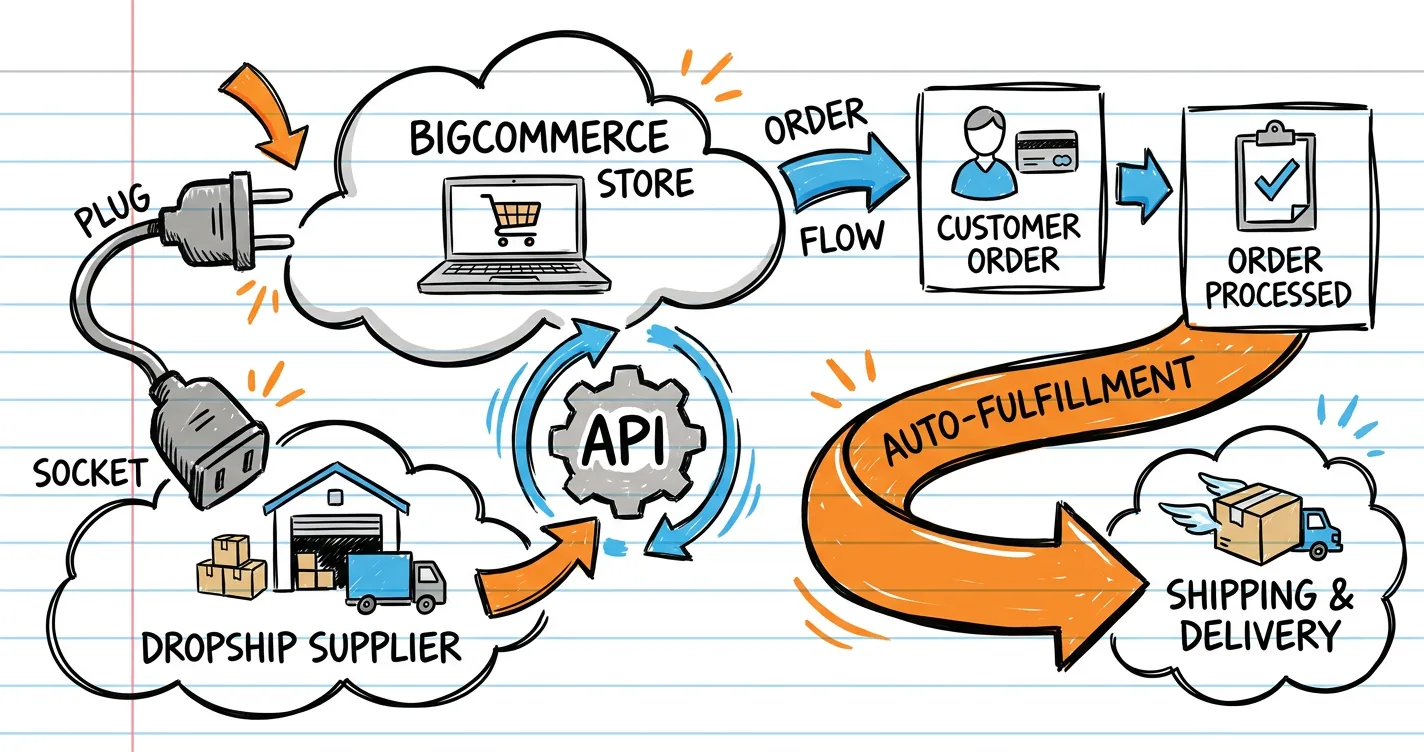
BigCommerce dropship integration is the connection that makes suppliers and your store talk automatically: products import, inventory syncs, and orders route to the supplier without manual work. It is delivered through the App Marketplace (Spocket, DSers, CJdropshipping, and more) or through BigCommerce REST APIs for custom setups. This guide explains how the integration works and how to set it up.
How BigCommerce Dropship Integration Works
Under the hood, an integration has three jobs:
- Product sync — supplier catalogs (images, variants, prices) import into your BigCommerce store.
- Inventory sync — stock levels update both ways so you never oversell.
- Order routing — a new store order is pushed to the supplier for fulfillment and tracking.
BigCommerce exposes REST APIs for products, inventory, and orders, which is why so many suppliers build native apps on top of it.
The Two Ways to Integrate
1. App Marketplace (No Code)
- Apps → Marketplace in your BigCommerce admin.
- Search and install Spocket, DSers, CJdropshipping, Modalyst, or Printful.
- Authorize your supplier account.
- Products and orders now sync automatically.
Best for most sellers — zero development and typically free or low-cost per month.
2. REST API (Custom / Enterprise)
BigCommerce’s API lets a supplier or developer build a bespoke integration for:
- Custom product data mapping.
- Enterprise ERP (SAP, NetSuite) connections.
- Unique discounting, fulfillment, or dropship-supplier portals.
Best for high-volume brands where a marketplace app isn’t flexible enough.
Setting Up a Dropship Integration Step by Step
- Pick your supplier — Spocket (fast US), DSers (cheap AliExpress), or CJdropshipping (US warehouse + branding).
- Install the app from the Marketplace.
- Connect your account — authorize supply credentials.
- Map products — choose categories and set a global markup.
- Test a real order — place one to confirm routing and tracking number.
- Monitor inventory — enable sync so out-of-stock items hide automatically.
Common Integration Problems to Avoid
- Double inventory — selling the same product through two apps can create oversell; keep one source per SKU.
- Broken order data — supplier SKUs must map cleanly to your BigCommerce SKUs.
- Shipping zone gaps — US rates must be configured before orders flow.
- No test order — you find a routing bug on the first real customer.
When the API Route Is Worth It
Consider custom API integration when you:
- Sell hundreds of SKUs with complex mappings.
- Need enterprise ERP sync.
- Operate a multi-store footprint.
- Have a white-label or private supplier portal requirement.
Bottom Line
BigCommerce dropship integration connects your store to suppliers through the App Marketplace or REST APIs, automating product import, inventory sync, and order routing. Start with a no-code app (Spocket, DSers, or CJdropshipping), set a global markup, and always run a test order. See the full best BigCommerce dropship apps comparison, choose your first app, and read the complete dropshipping on BigCommerce guide for the bigger picture.
Frequently Asked Questions
How does BigCommerce dropship integration work?
Supplier apps install from Apps → Marketplace and connect via BigCommerce's REST APIs. The integration imports product catalogs with pricing, syncs inventory, and routes every new order to the supplier for fulfillment automatically.
Which suppliers integrate with BigCommerce?
The main natives are Spocket, DSers (AliExpress), CJdropshipping, Modalyst, Printful, and Wholesale2B. BigCommerce also exposes REST APIs so custom or enterprise suppliers can build their own integration.
Chat with Agent PYRA
Tell Agent PYRA your niche and it finds winning products with real-time data: saturation scores, Google Trends, competitor ad performance, and AliExpress sourcing links. Stop scrolling spreadsheets and let AI do the research.
- Real-time saturation & trend analysis
- Cross-referenced Shopify, Amazon & Facebook Ads
- AliExpress & supplier source links
- Competitor ad creative & performance data
Start Finding Winning Products Today
Join thousands of dropshippers who use Pyratrend to spot trending products before they saturate the US market. Get 30 free credits when you sign up — no credit card required.
- Daily updated US-market product data
- Facebook Ad Library integration
- Shopify competitor store tracking
- Custom watchlists & alerts
Explore more tools & platforms guides in the Pyratrend Insights hub, or check out today's trending products on our dashboard.